What is the AI Development Lifecycle, and how can we secure it?

Contents
- The AI Development Lifecycle (AI-DLC)
- The Secure AI Development Lifecycle (SAI-DLC)
- Evaluating Your AI Security
AI Development Lifecycle (AI-DLC)
Let’s first start by highlighting the different stages of creating a full-fledged AI product. I’ll be building on top of the Guidelines for Secure AI System Development and adding extra sections that I think are necessary.
The AI-DLC framework looks very similar to the Software Development Lifecycle; however, it has been modified to be specific to AI.
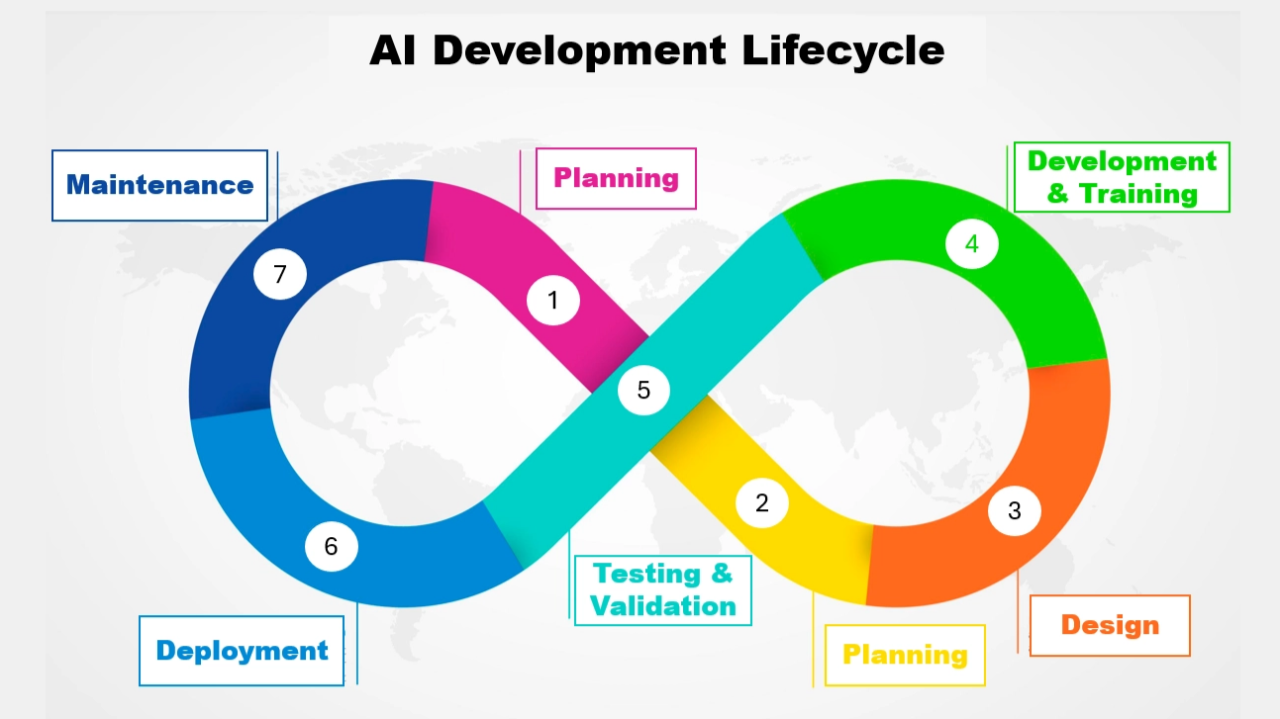
Part 1: Setup
During the Setup stage, we create a high-level overview of the AI product. It should include key stakeholders such as product team managers and other executives as required. It should also involve Senior technical team members, such as architects and developers.
1. Planning
The planning stage is to identify the scope of the AI and identify any constraints you are working with.
Things to consider include:
- What is the goal of the AI? Who will be the users? Create user stories to help clarify the scope of the AI and ensure you have some sort of "benchmark users" you can test your final product with.
- Define Measurable KPI’s for success. You can’t achieve something if you can’t measure it. Define what success is, and give some examples of how you could measure it.
- What laws, regulations, and frameworks must/should you comply with? AI regulation is becoming increasingly more prominent. DLA Piper includes a map with all the legal frameworks for every country, and what stage they are in as of right now. Think about some of the most obvious ones, like the EU AI Act and the NIST AI Risk Management Framework. But also think of ones indirectly impacting AI, such as GDPR, Cloud Sovereignty Framework, HIPAA, etc.
- Identify Possible Abuse That Could Happen With Your AI. There are many different ways AI can be abused for the benefit of the abusers. For example, they could steal training data, use your AI for malicious work, poison the AI, etc. Highlight these, and suggest possible ways of reducing the risk of them.
- What is required for success? Maybe you need a certain LLM to ensure your AI stays running. Or maybe you need a specific Python package to create your own CNN. Ensure you list out your dependencies and contingency plans in case you can no longer use your primary suppliers.
You’ve identified what success looks like, what your constraints are, and how people could use your product for harm.
2. Analysis
I’ll keep this one short. Based on the goals you want the AI to achieve, how can you verify that AI is indeed the right way to go?
- Reach out to potential customers and conduct questionnaires, or alpha testing, to see whether they like it or even want it. Don’t waste time making something nobody wants. I would highly recommend The Lean Startup if you're interested in building MVPs.
- Identify other ways of achieving the goal without the use of AI. Why are they inferior to the AI solution?
You’ve identified whether people want the product, and why AI is the only way your goals can be achieved.
3. Design
Design is the last stage in setup. This is where your AI fundamentals come into play. You need to now decide on the architecture of the system.
Things you should consider include:
- What type of AI architecture will you use? Machine Learning? Deep Learning? Natural Language Processing? LLMs? Supervised Learning vs. Unsupervised Learning vs. Self-Supervised Learning? Transfer Learning? Is it a classification or a regression task? Reinforcement Learning? You get the point. AI is more than just LLMs.
- Where will your data come from? Data is 75% of the solution, 25% comes from the architecture of the AI itself. If you have bad data, no matter how good your AI model is, it won’t help. Identify sources for your data. Will you carry out Data Augmentation?
- What Hardware Will You Need For Your AI? Will you be using a cloud provider to train your AI, or will you have your own data centre for it? How will people interact with your AI? Is it hosted locally, or will you provide it as a SaaS platform?
You’ve identified what type of AI you will be creating, where the data will come from, and what hardware you need to make it a reality.
Part 2: Technical
Now it’s time to turn a piece of paper into a fully fledged product.
4. Development & Training
Now it’s time to develop the code for the AI and commence the actual AI training.
Things carried out during this stage include:
- Data Preparation: Ensuring all your data is in a format that can be accepted by your AI.
- Parameter Tuning: A simple way to improve your model by fine-tuning the parameters of the model. This could be by improving the system prompt for LLMs, or for CNNs by decreasing the batch size, modifying the epoch and the learning rate.
- Algorithm selection: Before, you decided on the type of AI architecture you would be using, but each one has plenty of different algorithms you can use. For example, if you chose LLMs, would you use ChatGPT, Claude or Gemini?
- Advanced AI Training Techniques: These techniques help improve your AI’s accuracy. They could include Batch Normalisation and Dropout, which decreases the chance of the AI to just memorise, and instead forces it to learn viable patterns.
- Module Selection: If you’re developing an in-house AI, you will definitely be deciding between different AI packages. For example, in Python, you could choose: TensorFlow, PyTorch, Keras, OpenCV, Hugging Face Transformers, etc.
Have a fully fledged product that has been created using industry standards and is of high quality.
5. Testing & Validation
Testing and Validation is the secret steps to having a good AI product. This is where you ensure it is working as normal and is meeting the success criteria labelled in the planning stages.
Some things to test and validate include:
- Normal user behaviour: Is it successful at tackling user problems? What is the success rate? How could we improve this number?
- Anomalous user behaviour: Does the AI handle random inputs from users that the AI was not trained on? How does it handle it? Does it try to respond, or does it tell the user it cannot respond?
You’ll be able to validate that your AI is working as intended and that no obvious issues exist with the product.
Part 3: Management
In this last stage, it’s time to handle how AI will be deployed and maintained. It’s the final step before go-live, and is where you will spend a lot of your ongoing hours for this product.
6. Deployment
Deploying your product should consist of industry standards, such as using a CI/CD platform to ensure the AI you’re deploying is being kept up-to-date, and the latest version is always available to the user. Having separate environments is also key for this section.
Having a backup plan is also critical. If, for whatever reason, the new AI you’ve released is causing too much trouble, then you should be able to revert to previous versions of the AI until the issues have been identified and fixed.
You’ll be able to deploy your new AI versions safely and have a way to be able to constantly improve and fine-tune them.
7. Maintenance
During this last stage, you want to ensure that bugs are being found and reported. This will then allow you to fix any issues with your AI. You want to track logs, system performance, ongoing quality, security, user experience, etc.
You’ll have a set of dashboards that you can monitor for possible issues. These issues will then influence what you need to do to improve your current model.
Secure AI Development Lifecycle (SAI-DLC)
Now that AI-DLC has been introduced, I can go into addressing some of the most critical flaws with AI and where you can tackle these issues in the different stages of the AI-DLC.
1. Secure Planning
- Identifying different Regulatory and Compliance standards you must follow.
- Identifying AI Frameworks you should be following.
- Identifying suppliers required for your AI. (SBOMs/Dependencies/AI BOMs/ML SBOMs/Licenses) and carrying out supplier vetting.
2. Secure Analysis
- Stakeholder Input - Gathering diverse perspectives to identify potential bias or misuse cases.
- Verification Requirements - Implementing identity verification for alpha testers or survey participants to prevent automated "botting" of feedback.
3. Secure Design
- Data Segmentation - Segmenting data from external and internal sources. Segmenting customer-provided data from training data. Disconnecting the AI model from live-data source if needed. Segmenting user data from other user data. These are all ways you could limit the impact of an attack, but also limit the malicious behaviour your AI can carry out.
- Threat Modelling - A technique primarily used in SDLC, however, can still be applied in the AI-DLC. Identify, quantify and mitigate security threats, vulnerabilities and design flaws before they become a reality.
- Reliable Models - Malicious models do exist; it is imperative to make sure you are choosing the right and safe models for the task. Choose ones that have been verified and have passed your third-party vetting.
- Vet Data Sources - Only use trusted sources that have met your requirements. Some data sources could be best-case scenario inaccurate, and worst-case scenario, deadly. Therefore, you must choose reliable ones.
- Least Privilege Access - Designing the system so the AI agent only has the minimum permissions necessary to function.
- Infrastructure Hardening - Ensuring the hosting environment (Cloud/On-prem) is configured to prevent lateral movement.
- Resource Allocation Management - Planning for compute limits to prevent "Denial of Wallet" or resource exhaustion.
4.1 Secure Development
- Input & Output Filtering - Ensuring that the inputs you receive are not in a malicious format, and are in the expected format. Ensuring that the output your AI produces does not contain any malicious data.
- Parameterised Queries - A technique that can be used to prevent malicious code injections from occurring.
- Output Formats - Ensuring that the output of your AI is in the intended format.
- Source Validation - If you’re providing some sort of response to the user, link back to where the source of your response has come from. If you’re using an LLM, have it so that all information is sourced. Or if you’re training your system on behaviour, have it reference what type of data it is training on.
- Critic Models - These models are recursive by nature. They keep asking for better and better responses from your LLMs before sending back the final response. For whatever reason, the more you force the AI to think and check its work, the more likely it is to be correct.
- Constitutional AI - Popularised by Anthropic, it forces the AI to follow a set of rules that align the responses to what humans consider right and wrong.
4.2 Secure Training
- Adversarial Training - The process of including anomalous training data to make the model more resilient to adversarial attacks (attacks that deliberately attack the model by feeding it malicious data with hopes of making the model worse or stopping it from functioning).
- Privacy Enhanced Training - Homomorphic encryption, tokenisation and data masking are good ways of training AIs on sensitive data. They all use a different technique, so your use-case will determine your technique.
- AI Hardening - Implementing system prompt hiding and obfuscation to prevent prompt leakage.
- Strict Content Security Policies (CSPs) - Preventing the AI from executing unauthorised scripts in the browser or environment.
- Sensitive Data Scrubbing - Ensuring system prompts and training templates are free from PII or secrets.
5. Secure Testing & Validation
- Red Teaming - Actively trying to "break" the model through prompt injection or jailbreaking. This could be done using a human pentester or assisted with AI pentesting solutions (something that is becoming increasingly more popular).
- Bias Testing - Checking for skewed outputs across different demographics.
- Agentic Hardening - Testing the "agent" tools (e.g., its ability to call APIs) to ensure it cannot perform actions outside its sandbox.
6. Secure Deployment
- Human-In-The-Loop - Depending on your application, having a human ready on stand-by or even a human who can address concerns brought up by your customer might be a good idea.
- User Education and Transparency - Being transparent with how data is used, that it could be wrong, and that your AI should be used with caution is a way of protecting yourself if anything happens, but also the user through awareness.
- Encourage users to verify and check answers - Similar to the above one. Encourage users to verify the work produced by the AI if the accuracy of the response is critical.
- AI Model Signatures - Have a way for users to verify your model if they are downloading it from the internet.
7. Secure Maintenance
- Model Monitoring - Are the open-source models/third-party models you’re using being updated with malicious or unethical practices? Monitoring should take place to ensure everything is up-to-standard with your organisation.
- AI Malicious Usage Monitoring - Having a way of flagging potential misuse of your AI, and then being able to review it, might be something worth considering. Bear in mind, this could decrease customer trust in you; therefore, only use it if you need to. You could do this by monitoring input or output.
- Accuracy Monitoring - Have a way of testing your model over time to see if accuracy begins to drop below the expected baseline.
- Rate Limiting - Ensuring your AI isn’t being abused by the same user is critical to prevent DDoS or Denial of Wallet Attacks.
- Patch Management - Keeping software up-to-date, using frequently updated models, and avoiding deprecated ones.
- Anomaly Detection - This is a broader version of AI Malicious Usage Monitoring and Rate Limiting, but certain metrics can be used to identify malicious behaviour. Use these metrics, alongside AI, to identify anomalies that diverge from the baseline.
- Timeouts and Throttles - If users have been identified as malicious, block them from future access for a certain period of time or decrease the number of requests they can make.
- Validator Models - These are models that check the response of your AI. They can be configured in a way that prevents sensitive or malicious outputs. It’s a step above output filtering, because it happens at runtime, and can even be used to fight against prompt injection.
Evaluating Your AI Security
If you’re looking to check your AI Security against industry standards, OWASP is the best place to go as of right now.
However, maybe some of the AIs you’re creating aren’t covered there. I would recommend creating some sort of measurable KPI for each control you’ve implemented from above, and creating a pass or fail criterion for each one. You can then use this to evaluate your AI Security.
Conclusion
It would simply be to time consuming and unrealistic for me to include every single possible control in as much detail as possible. However, if you did want me to go into more detail on any one of these points, I would be more than happy to make another post on it.
Noticed something wrong? Or maybe you disagreed with a point I made? Let me know in the comments below, and I’ll get it fixed.